


本文是《wordpress(共168篇)》专题的第 166 篇。阅读本文前,建议先阅读前面的文章:
前言
今天分享的教程是WordPress子比主题美化教程:文章角标及封面图底部美化。简单的来说,就是在文章发布页面增加一个附加选项,可以通过这个附加选项达到我们想要的美化效果
效果图
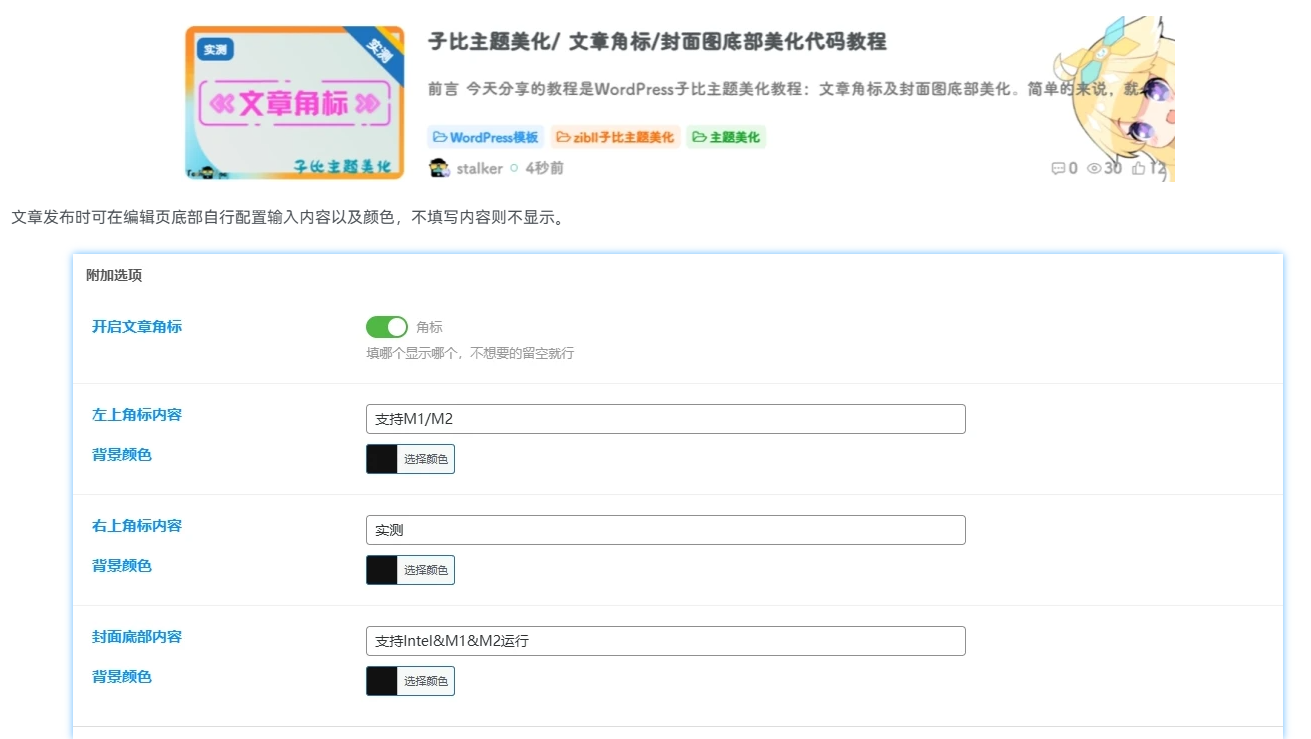
代码
1.Zibll主题设置>>全局&功能>>自定义代码>>自定义CSS样式
/*角标css*/
.posts-item.card .item-thumbnail {
  background:#c4cffa26;
  width:100%;
  padding-bottom:var(--posts-card-scale);
}
a.item-category {
  position:absolute;
  left:10px;
  top:10px;
  padding:5px 6px;
  font-size:1rem;
  line-height:1;
  color:#fff;
  background:var(--theme-color);
  border-radius:6px;
}
a.item-category-app {
  position:absolute;
  height:24px;
  line-height:24px;
  width:100%;
  text-align:center;
  bottom:0;
  left:0;
  background:radial-gradient(circle,#3783ff,#3783ffbf);
  color:#fff;
  font-size:12px;
  border-radius:0 0 10px 10px;
}
a.item-category-app-b {
  position:absolute;
  height:24px;
  line-height:24px;
  width:100%;
  text-align:center;
  bottom:0;
  left:0;
  background:radial-gradient(circle,#ff5631,#ff5631ba);
  color:#fff;
  font-size:12px;
  border-radius:0 0 10px 10px;
}
a.item-category-app-c {
  position:absolute;
  height:24px;
  line-height:24px;
  width:100%;
  text-align:center;
  bottom:0;
  left:0;
  background:radial-gradient(circle,#464242,#464242ad);
  color:#fff;
  font-size:12px;
  border-radius:0 0 10px 10px;
}
span.bottom-l {
  overflow:hidden;
  text-overflow:ellipsis;
  white-space:nowrap;
}
.n-collect-item-bottom {
  position:absolute;
  bottom:0;
  left:0;
  width:100%;
  height:25px;
  background:var(--theme-color);
  border-radius:0 0 var(--main-radius);
  font-size:13px;
  color:#fff;
  text-shadow:0 2px 2px rgba(0,0,0,.16);
  display:flex;
  -webkit-box-align:center;
  align-items:center;
  -webkit-box-pack:justify;
  justify-content:space-between;
  padding:0 18px;
  z-index:5;
  justify-content:center;
}
.jiaobiao2 {
  position:absolute;
  top:10px;
  right:-50px;
  z-index:1;
  width:140px;
  height:20px;
  background:var(--theme-color);
  color:#fff;
  line-height:20px;
  transform:rotate(45deg);
  text-align:center;
  font-size:12px;
  left:auto;
  border-radius:0 50px 50px 0;
}2.将下面代码添加进子比主题下的wp-content/themes/zibll/functions.php文件内。
CSF::createMetabox('Mario', array(
    'title'     => '附加选项',
    'post_type' => array('post', 'plate', 'forum_post'),
    'context'   => 'advanced',
    'data_type' => 'unserialize',
));

CSF::createSection('Mario', array(
    'fields' => array(
        array(
            'title'   => __('开启文章角标'),
            'id'      => 'Mario_edit',
            'type'    => 'switcher',
            'label'   => '角标',
            'desc'   => '填哪个显示哪个,不想要的留空就行',
            'default' => false
        ),
        array(
            'dependency' => array('Mario_edit', '!=', ''),
            'title'   => __('左上角标内容'),
            'id'      => 'right_text',
            'type'    => 'text',
            'default' => '支持M1/M2',
        ),
        array(
            'dependency' => array('Mario_edit', '!=', ''),
            'title'   => __('背景颜色'),
            'id'      => 'right_color',
            'type'    => 'color',
            'default' => '#121212',
            'class'    =>'compact',
        ),
        array(
            'dependency' => array('Mario_edit', '!=', ''),
            'title'   => __('右上角标内容'),
            'id'      => 'left_text',
            'type'    => 'text',
            'default' => '实测',
        ),
        array(
            'dependency' => array('Mario_edit', '!=', ''),
            'title'   => __('背景颜色'),
            'id'      => 'left_color',
            'type'    => 'color',
            'default' => '#121212',
            'class'    =>'compact',
        ),
        array(
            'dependency' => array('Mario_edit', '!=', ''),
            'title'   => __('封面底部内容'),
            'id'      => 'bottom_text',
            'type'    => 'text',
            'default' => '支持Intel&M1&M2运行',
        ),
        array(
            'dependency' => array('Mario_edit', '!=', ''),
            'title'   => __('背景颜色'),
            'id'      => 'bottom_color',
            'type'    => 'color',
            'default' => '#121212',
            'class'    =>'compact',
        ),

    ),
));
3.打开子比主题文件路径:/inc/functions/zib-post-list.php,在515行如图添加下方代码。

//列表图片封面右上角标
        if (get_post_meta($post->ID, 'Mario_edit', true)){
        $right = get_post_meta($post->ID, 'right_text', true);
        $right_color = get_post_meta($post->ID, 'right_color', true);
        $bottom = get_post_meta($post->ID, 'bottom_text', true);
        $bottom_color = get_post_meta($post->ID, 'bottom_color', true);
        $left_text = get_post_meta($post->ID, 'left_text', true);
        $left_color = get_post_meta($post->ID, 'left_color', true);

        if ($left_text) {
            $sticky = '<badge class="jiaobiao2" style="background:'.$left_color.';">'.$left_text.'</badge>';
        } else {
            $sticky = '';
        }
        if ($right){
            $sticky .= '<a class="item-category" style="background:'.$right_color.';"> '.$right.' </a>';
        }
        if ($bottom){
            $sticky .= '<div class="n-collect-item-bottom" style="background:'.$bottom_color.';"><span class="bottom-l">'.$bottom.'</span></div>';
        }
    }
温馨提示
此代码教程涉及修改主题源文件,建议提前备份源文件再进行操作,避免出现不可逆的损失。
按上述流程操作完成后,建议清理cdn/浏览器缓存。(未开启缓存忽略即可)
您已阅读完《wordpress(共168篇)》专题的第 166 篇。请继续阅读该专题下面的文章:
购买必读
本站模板没有任何后门,也不会和我们服务器有任何通信,请您放心使用。
本源码一次性买断,没有二次费用,并享受免费更新。
在使用本站模板时,请不要使用我们的产品从事违反中华人民共和国法律、违反公序良俗的活动,否则我们有权拒绝服务,并配合有关单位予以处置。如果您不符合条件,请勿购买。
售后是指通过QQ与客服联系处理问题,售后过期不影响您对主题的使用和更新。免费三个月售后服务。售后服务时间为工作日早9点到晚5点。如果不在线可以QQ留言,我们会尽快给您答复。
售后服务包括程序的使用、BUG的处理、意见建议等。不包括技术服务、网站优化、二次开发、环境配置、服务器运维等。
代码类商品属于数字化商品,具有可复制性,不支持退款,详见《网络交易管理办法》第二章 第16条 第三类。
请仔细阅读我们的用户协议:用户协议
本站模板没有任何后门,也不会和我们服务器有任何通信,请您放心使用。
本源码一次性买断,没有二次费用,并享受免费更新。
在使用本站模板时,请不要使用我们的产品从事违反中华人民共和国法律、违反公序良俗的活动,否则我们有权拒绝服务,并配合有关单位予以处置。如果您不符合条件,请勿购买。
售后是指通过QQ与客服联系处理问题,售后过期不影响您对主题的使用和更新。免费三个月售后服务。售后服务时间为工作日早9点到晚5点。如果不在线可以QQ留言,我们会尽快给您答复。
售后服务包括程序的使用、BUG的处理、意见建议等。不包括技术服务、网站优化、二次开发、环境配置、服务器运维等。
代码类商品属于数字化商品,具有可复制性,不支持退款,详见《网络交易管理办法》第二章 第16条 第三类。
请仔细阅读我们的用户协议:用户协议